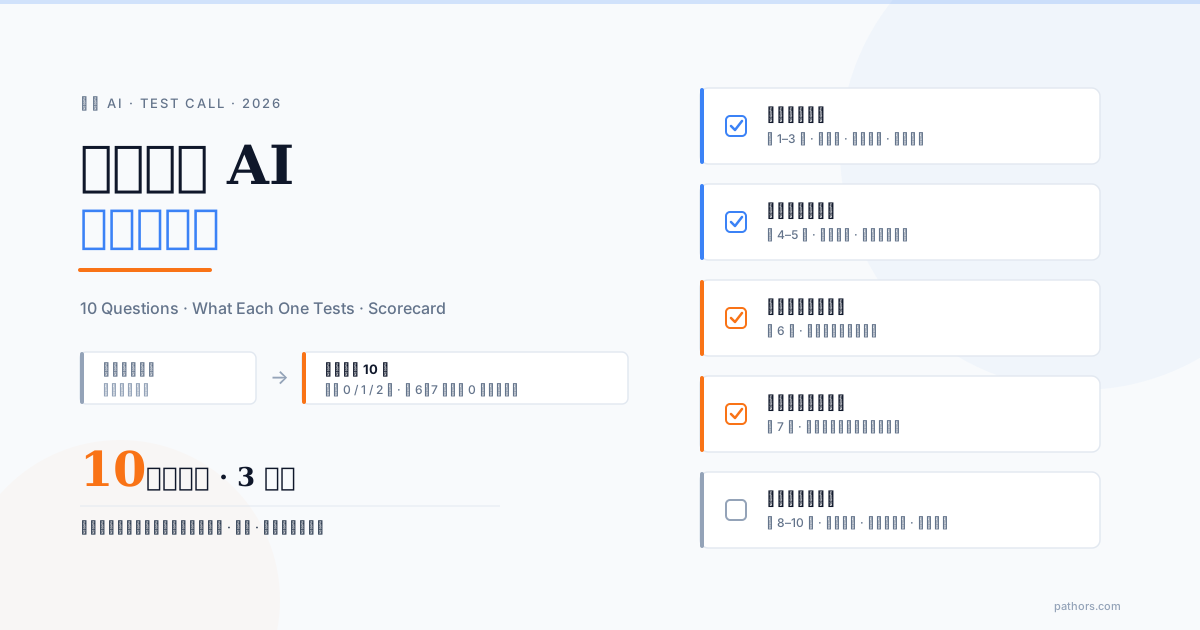
When you test-call a phone AI, do not just say hello and hang up. Run the same 10-question script against every vendor: three questions on whether it understands you (accents, code-switching, reading numbers back), two on conversation skills (interrupting it, two requests in one sentence), two on whether it looks up real data or recites a script, one on handing off to a human, one on tone and silence, and a last one on whether the call leaves a record. A three-minute call exposes about 80 percent of the difference between two systems, provided you know what to ask.
A vendor's demo line is the most honest information you will get, but it is only honest to people who know what to ask. Too many decision makers dial in, hear a pleasant voice say "Thank you for calling, how can I help?", think "sounds good", and sign. Three months after go-live they discover it cannot follow the front-desk staff's accent, falls apart when a customer interrupts, and invents answers when asked about availability.
This article gives you a script you can read out loud: which capability each question probes, what a good answer sounds like, what a red flag sounds like, and a scorecard so two vendors can be measured with the same ruler.
The short version: three minutes reveals most of it, if you know what to ask
Whether a phone AI is any good comes down to four things: does it understand you, does the conversation hold together, are its answers looked up or made up, and does it hand you to a person gracefully when it cannot cope. All four can be tested on a demo line with no technical background. Keep this table open on your phone and tick as you go.
| # | What you say | What it tests | Good sign | Red flag |
|---|---|---|---|---|
| 1 | Normal pace, your natural accent or dialect (in Taiwan: Mandarin mixed with Taiwanese Hokkien) | Accent and dialect recognition | Understands and answers naturally | Asks you to repeat more than twice, or answers a different question |
| 2 | "I need a repair on my iPhone 17 Pro, and the AirPods case is broken" | Code-switching, brand and model names | Repeats the model correctly | Mishears the model without checking, or skips it |
| 3 | "My number is 0912-345-678, order A2026-0829. Read that back to me" | Digit strings and read-back | Reads it back verbatim, accepts corrections | Gets it wrong unknowingly, or refuses to read it back |
| 4 | Cut in mid-sentence: "Wait, that is not what I asked" | Barge-in handling | Stops within about a second and listens | Finishes its script first, or talks over you |
| 5 | "I want to change my time, and also, do you have parking?" | Multiple intents in one sentence | Handles both, or says which it will do first | The second request vanishes |
| 6 | "Is there a table at 3 pm today?" (swap in your industry's live inventory) | Real system lookup | Visible lookup, specific answer | Instant "Yes" no matter which slot you ask about |
| 7 | Something outside its knowledge base: "What is the owner's surname?" | Honesty about the unknown | Admits it has no data, offers an alternative | Confidently gives an answer |
| 8 | "I want to talk to a person" | Transfer and handoff | Explains the transfer, summarises first, the human does not make you repeat | Cannot transfer, or the human opens with "How can I help?" |
| 9 | Speak impatiently, then stay silent for five seconds | Emotion and edge cases | Softens tone, checks whether you are still there | Ignores tone; hangs up on silence without a word |
| 10 | After hanging up, ask the vendor: "Where is the record of that call?" | Call records and visibility | Summary, transcript and destination system within minutes | Nothing to show, or only an audio file |
Questions 1 to 3: Does it understand you?
Speech recognition is the foundation; if it is off, everything above it is wasted. In Taiwan and most APAC markets, three things make inbound calls hard: accents and dialects, code-switching, and digit strings.
Question 1: Accent and dialect
Talk the way you would talk to a shop, not the way you would read the news. In Taiwan that means Mandarin with a local accent and a phrase or two of Taiwanese Hokkien; better still, have an older colleague or relative place the call. This checks whether the recognition model was tuned for how your customers actually speak.
Good: it understands "are you open today" and replies naturally; if it only partly understood, it repeats what it caught and asks you to confirm. Red flags: two or more "Could you say that again?" in a row, or a confident answer to a question you did not ask. The second is worse, because after go-live it will mis-answer customers with the same confidence.
Question 2: Code-switched brand and model names
Use product names that really come up in your business: "iPhone 17 Pro", "the AirPods case", or for a clinic "book PRP and HIFU". This checks whether English words inside a Chinese sentence get shredded, and whether the digits and letters in a model name survive.
Good: it repeats the model correctly and ideally clarifies, "17 Pro or 17 Pro Max?" Red flags: it hears a different model and moves on without checking, or drops the model entirely and says "Sure, for repairs...".
Question 3: Read a string of digits back
"My phone number is 0912-345-678, order number A2026-0829. Read it back to me." Phone numbers, order numbers and ID digits are where phone support most often goes wrong and can least afford to. Asking for a read-back also tests whether the system confirms critical data on its own.
Good: verbatim read-back, and when you correct one part it changes only that part. In Pathors' experience, well-built systems slow down on easily confused digits during the read-back. Red flags: a wrong digit with no confirmation, or "Got it, noted" with no read-back, which means after go-live you never know whether it captured the right number.
Questions 4 and 5: Conversation, not question-and-answer
Understanding a sentence and holding a conversation are different skills. Real callers interrupt, change topic, and pack two requests into one breath.
Question 4: Interrupt it mid-sentence
Wait until it starts a longer explanation (opening hours, list of services) and cut in: "Wait, that is not what I asked." The industry term is barge-in; in plain language, does it yield?
Good: it stops within about a second, listens to the end, and picks up the thread: "Of course, what did you want to ask?" Red flags: it finishes its script before acknowledging you, or two voices overlap and the reply comes out garbled. The most common post-launch complaint about this kind of system is "it just keeps talking and never listens".
Question 5: Two things in one sentence
"I want to change my appointment time, and also, do you have parking?" This tests whether an LLM is interpreting meaning behind the scenes or an older keyword matcher is grabbing the first hit.
Good: it handles both, dealing with the time change and then volunteering "and about the parking...", or says up front "Let me change the time first, then we will cover parking." Red flag: the parking question disappears, and unless you ask again it never comes back.
Questions 6 and 7: Real data or a memorised script?
This is where demo lines are easiest to fake. A system that only recites a script, however natural the voice, is a talking FAQ recording.
Question 6: Ask something that requires a system lookup
Ask for live inventory in your industry. Restaurant: "Is there a table at 3 pm today?" Clinic: "Does Dr. Wang have slots tomorrow morning?" Hotel: "How many twin rooms are left this Saturday?" This checks whether the AI is connected to a reservation, booking or room-status system, which is the fundamental difference between phone AI and a touch-tone IVR: getting the thing done on the spot instead of routing the caller elsewhere.
Good: a visible lookup ("Let me check", a pause of half a second to a second) followed by a specific result: "3 pm is available, 3:30 is full." Ask a different slot and the answer should change. Red flag: an instant "Yes, we look forward to seeing you", and the same "yes" for three slots in a row. If the vendor says the demo line is not connected to data, ask them to demonstrate the lookup against a test database at least.
Question 7: Ask something outside its knowledge base
Pick a question it cannot have data for, "What is the owner's surname?", or plant a false premise: "You offer three hours of free parking, right?" (when they do not). Research indicates roughly 25 percent of natural questions contain a false premise and more than half are ambiguous (source), so a large share of what real customers ask is exactly what the AI should not answer directly.
Good: "I do not have that information, I can pass you to the team", or "We do not offer three hours of free parking; the current rule is...". Correcting the false premise matters more than answering. Red flag: it gives an answer. Any answer. "The owner's surname is Chen" becomes a complaint after go-live. For how to prevent this at the knowledge-base level, see how to build a phone AI knowledge base.
Question 8: Ask for a human
"I want to talk to a person." No reason needed; if it asks why, say "I just want to talk to someone." This tests three things: can it transfer at all (some demo lines have no transfer wired up), does it summarise before transferring ("I will pass along your time change and the parking question"), and once you are through, do you have to start over?
Good: it does not talk you out of it, says it will transfer, and states briefly what it is passing along; the person who picks up already knows who you are and what you need. If no human is on the demo line, it should still explain what happens when nobody is available (message, callback). Red flags: it keeps asking "How else can I help?" to hold you, or the human opens with "Hello, what can I do for you?", which means the previous three minutes were wasted. See designing the AI-to-human handoff for the full topic.
Question 9: Emotion and edge cases
Two parts. First, speak with obvious impatience: "This is the third time I have called, can you actually handle this or not?" Then, when it asks you a question, stay silent for five seconds. Impatience tests whether it detects tone and adjusts; silence tests edge-case handling, because real callers get distracted or go looking for a document.
Good: on impatience, shorter sentences, one apology, straight to the point. On silence, after three to five seconds it checks "Are you still there?", and only after a longer pause explains how it will end the call. Red flags: it ignores the tone and keeps reading the same script, or hangs up after five seconds of silence without a word, which makes customers think the system is broken.
Question 10: After the call, is there a record?
After hanging up, ask the vendor: "Where is the record of that call? Can I see it?" The most underrated value of phone AI is that every call leaves a record: a summary, a transcript, the detected intent, and which system it wrote to (CRM, reservation sheet, ticket). This determines whether you can manage and improve the system after go-live.
Good: within minutes the vendor opens the dashboard and shows the transcript, the AI summary, and whether the phone and order numbers you gave were captured correctly as fields. Red flags: nothing to show, "we will send it later", or only an audio file. Without structured records you will have no idea what the system tells your customers every day.
How to score the call
Score every question 0, 1 or 2:
| Score | Recommendation |
|---|---|
| 16 to 20 | Move to the next step: a POC with your own real FAQ and data |
| 11 to 15 | Workable. List every 0 and ask the vendor whether it is a product limit or a demo-environment limit |
| 10 or below | Do not proceed unless every 0 has a verifiable reason such as "the demo is not connected to data" |
Two rules matter more than the total. First, a 0 on either question 6 or question 7 is an automatic fail: poor recognition can be tuned, but a system that invents answers is a liability from day one. Second, have three different people call the same system: the owner, someone from the front desk or support team, and a relative who knows nothing about the project. If their scores diverge widely, the system favours articulate callers, and your customers are ordinary people.
Common mistakes when testing
Most evaluation failures are not vendors lying; they are buyers stepping on one of these:
The demo line is free and three minutes is short. The only difference is whether you dial in with these ten questions in hand. The same script against two vendors, compared on the same scorecard, gets you closer to the truth than ten slide decks.
If you are still working out what phone AI can do and how it is priced, start with what is phone AI: the 2026 complete guide. If questions 6 and 7 made you wonder what the AI is actually answering from, how to build a phone AI knowledge base explains that layer.
The script applies to Pathors too. Visit the AI phone customer service page, place a call, and put these ten questions to it.
Frequently Asked Questions
How long should a phone AI test call take?
Three to five minutes. Working through the ten questions in order takes about three minutes; with a few follow-ups you will be done inside five. Do not make one long call. Make several shorter calls at different times of day instead, because speech systems are not fully deterministic and the same question can go differently on a second attempt.
What phone should I call from?
Call the way your customers most likely would: a regular mobile phone, on speaker, in a slightly noisy environment. Do not test with a headset in a quiet meeting room; those are ideal conditions and will not show real-world performance. If you can, also place one call from a landline, because landline audio is compressed differently from mobile.
Can I test dialects and accents?
Yes, and you should. In Taiwan a meaningful share of inbound calls mix Mandarin with Taiwanese Hokkien, especially in restaurants, clinics and traditional industries, and question 1 is designed for exactly that. If a vendor says dialect support is still in development, ask them to state clearly whether and when it will be supported and put it in the contract. Do not accept a vague probably.
Is the vendor demo line the same as the production system?
Not entirely. The main difference is data. A demo line usually runs on sample data or no data at all, while production connects to your reservations, CRM and knowledge base. So questions 6, 7 and 10 show you capability on the demo line, and you should verify them again with your own data before go-live. Recognition, barge-in and transfer behaviour are usually consistent between demo and production.
How many times should I call the same system?
At least three times, by three different people: the owner, a front-line colleague, and someone who knows nothing about the project. Adding calls at different times of day, morning, lunchtime peak and evening, is even better. If the three scores differ widely, the system is picky about accents or speaking style, and that matters more than the average.
How do I compare two vendors?
Same ten questions, same callers, same week, then put the two scorecards side by side. Check first whether either vendor scored 0 on question 6 or 7, then compare totals, then look at the spread between your three callers. When totals are close, let question 10 decide: the vendor whose call records you can read and act on directly will be easier to manage after go-live.