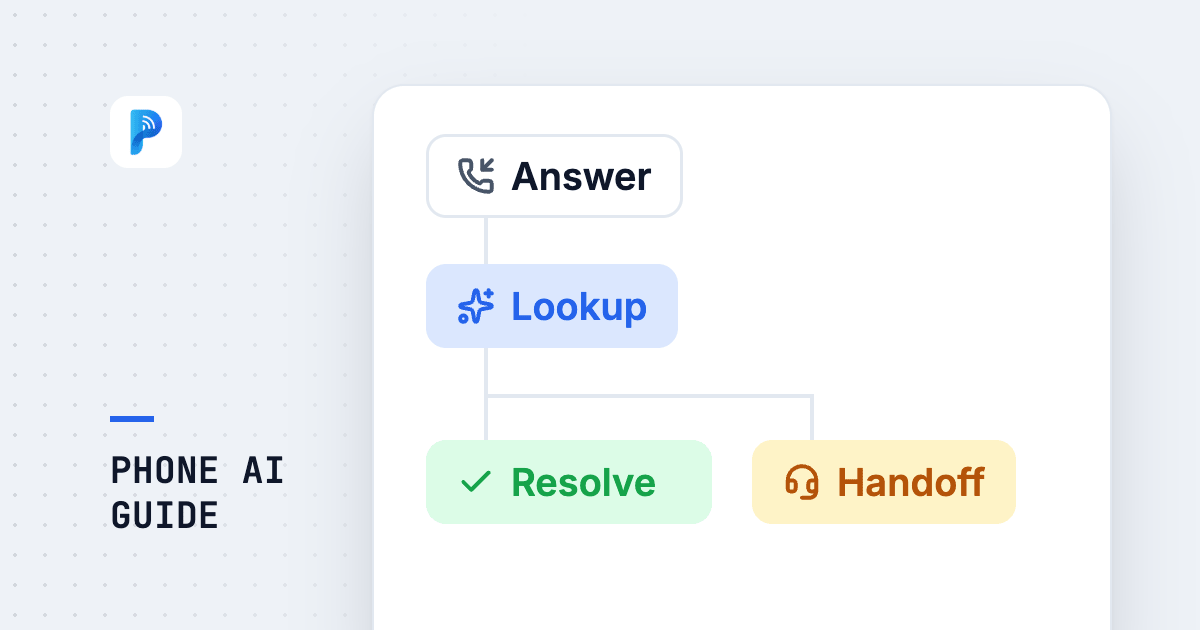
Phone AI is a system that uses conversational AI to answer or place calls directly: the caller explains what they need in ordinary language, the AI understands it, queries real data, completes the look-up or the booking on the spot, transfers to a person when needed, and turns the whole conversation into a record. The difference between this and a touch-tone IVR is not that it sounds nicer. It is that an IVR routes people somewhere else, while phone AI finishes the job on the call.
In 2026 the term shows up in Taiwan written both ways — phone AI and AI phone — and means the same thing. This guide works through the questions that actually stall an evaluation: how it works, what it can do, what it cannot, whether you have to touch your existing PBX, how the pricing is structured, and how to tell whether a given offering is worth deploying.
What Is Phone AI? How It Differs from IVR Menus and Voicemail
Phone AI (also written as AI phone or AI calling) means one thing: a system that uses conversational AI to answer or place phone calls directly. Callers do not sit through a menu, do not press digits, and do not leave a message hoping for a callback. They explain what they need in ordinary language, the AI understands it, looks up real data, gives an answer, completes a booking or a reschedule, hands off to a person when a person is genuinely required, and leaves behind a readable record once the call ends.
The difference between phone AI and the three older forms of call automation fits in one sentence: the older three route people somewhere else; phone AI finishes the job on the call.
| Approach | What the caller has to do | What it can actually resolve | After hours |
|---|---|---|---|
| Voicemail | Leave a message, then wait for a callback | Nothing — only a message is captured | Messages pile up until morning |
| Touch-tone IVR | Listen to the menu, then press a number | Routes to an extension or a department | Usually just plays an announcement |
| Speech-recognition IVR | Say a keyword the system recognises | Keyword match, then routing | Same as above — still routing |
| Phone AI | Just talk, in everyday language | Look-ups, bookings, reschedules, confirmations, transfers, call records | Identical to business hours |
There is a very simple test for whether a system is genuinely phone AI: ask it something that is not on the menu. Try a sentence like this one: my flight lands late on Friday, my wife will arrive before me, can she check in first? A touch-tone IVR will ask you to make a selection again. Phone AI should be able to pull apart the three facts in that sentence — two guests, two different arrival times, one of them needing early check-in — and answer accordingly.
How Phone AI Works: From the Ring to the CRM Record
Most of the architecture explanations still circulating describe a strictly sequential pipeline: PSTN inbound, then automatic speech recognition (ASR), then natural language understanding (NLU), then dialogue management, then text generation, then text-to-speech (TTS). That pipeline still exists, but by 2026 half of it has changed in practice: speech-to-speech models now take audio in and put audio out, without round-tripping through text on every turn. Latency drops, and tone, pauses and the ability to pick up naturally after being interrupted all survive the trip.
A real call passes through five stages.
One, get the call in. Either land it directly over a SIP trunk, or put a VoIP gateway in front of or beside the existing PBX. This stage determines whether you need to change your number and whether the PBX has to be touched at all, and it is the part that needs the most alignment with your carrier and your MIS team.
Two, understand what is being said. Speech recognition here is not only a question of which language. It is Taiwanese-accented Mandarin, Chinese-English code-switching, callers who change their mind halfway through a sentence, and someone else talking in the background. Latency at this stage generally needs to stay under 500ms, or the conversation develops audible dead air.
Three, look up real data. This is what separates a usable system from a system that only chats. The AI has to reach the real systems through tool calls — reservations, room inventory, orders, CRM, calendars — rather than answering from model memory. The biggest risk with phone AI that is not wired into real data is not that it fails to understand; it is that it sounds completely fluent and is wrong.
Four, speak. Speech synthesis quality is what decides whether the caller thinks robot. What actually moves that perception is usually not the voice itself but the rhythm: does it pause where a person would pause, does it yield when interrupted, does it repeat a confirmation three times when once would do.
Five, leave a record. After the call, produce a transcript, a summary, intent labels and follow-up actions, and write them back into the CRM or ticketing system. Done well, this is what turns phone AI from a headcount-saving tool into an asset that accumulates data. For field design and write-back mechanics, see our complete CRM voice integration guide.
What Phone AI Can Do: Answering, Booking, Look-ups, Screening, Conversational Outbound
Across real deployments, the value concentrates in five kinds of work:
Outbound deserves a separate note, because two completely different products share the name.
| What the customer hears | A pre-recorded message, press 1 or press 2 | Natural conversation at human pace |
|---|---|---|
| What the customer can do | Press keys only, no speaking | Speak freely, ask questions back, change the time |
| What it suits | One-way notices, yes-or-no confirmation | Anything that needs questions answered or information collected |
| Hang-up rate | High — many hang up during the first line | Noticeably lower |
When evaluating vendors, it is worth asking one direct question: on your outbound calls, can the customer answer by speaking? Some offerings only support keypad replies, which is entirely adequate for notification use cases — but if what you need is to ask a customer which day they would like to move to, it is not the thing you want. For the full set of evaluation criteria, see how to choose an AI outbound calling system.
The Limits: Where Phone AI Does Not Belong
A vendor willing to talk about limits is generally more trustworthy, so this section is blunt.
Speech recognition is not 100% accurate. Mandarin recognition in a quiet room can be very accurate. Real calls have background noise, accents, and proper nouns like model numbers and street addresses, and accuracy drops noticeably. The response is not to hope the model becomes magical, but to design around it: read back critical information (phone numbers, dates, amounts) once for confirmation, and when something is unclear, rephrase the question rather than guessing.
Emotionally charged complaints should not go to AI. A customer who is already angry needs to feel understood, not to be answered correctly. Those calls should route to a person the moment emotional signals are detected.
High-risk and irreversible actions stay with humans. Large changes, identity changes, cancellations, clinical judgement — AI can gather the information and do the preparation, but the last mile should carry a human signature.
If it is not in the knowledge base, the AI should not invent it. This is the line to hold during configuration. The correct behaviour when the answer is unknown is let me transfer you to a colleague, not a plausible-sounding answer generated out of nothing.
In practice, four escalation rules cover most of it: transfer on detected negative sentiment, transfer when the same question has gone unresolved twice, transfer immediately when the caller asks for a person, and transfer when the request falls outside the knowledge base. And when transferring, carry the conversation summary across — do not make the caller start over. This is the single easiest part of the experience to get wrong, and the easiest to get right.
Does Deploying Phone AI Mean Changing Your Phone System?
This is the first concern in almost every evaluation, and the answer is usually: you do not need a new number, and you may not need to touch the PBX at all.
Three approaches, by depth of integration:
| Integration approach | What it touches | Who it suits | Typical timeline |
|---|---|---|---|
| Cloud call answering (lightest) | Only the forwarding rules on your existing number; the PBX is untouched | Testing the water, or covering after-hours only | A few days |
| Taking over specific extensions or scenarios | A VoIP gateway sits alongside the PBX; AI handles only nominated extensions or time windows | Existing PBX, no appetite for changing internal routing | One to two weeks |
| Direct SIP trunk landing | Calls arrive at the AI first, then route back inside by rule | High call volume, full conversation analytics wanted | Two to four weeks |
Worth clearing up: transfers. When a gateway only takes over specific extensions, the PBX internal transfer logic was never modified in the first place, so the worry that AI will stop us transferring calls generally does not materialise. The AI handles the segment assigned to it, and everything else behaves as before.
Three technical details to confirm up front: who the number belongs to (does your carrier support forwarding and SIP), the model of the existing PBX and whether ports are free, and the number of concurrent calls at peak. Clear those three and most of the deployment variance disappears.
Further reading: Do you need to change your phone number for phone AI? PBX, IP PBX, landlines and SIP forwarding explained and how many calls can phone AI take at once? Busy lines and concurrency.
How Phone AI Pricing Works: Build Fee, Monthly Fee, Per-Minute
Quotes in the Taiwan market are essentially three-part:
| Cost component | What it covers | What moves the number |
|---|---|---|
| Build / onboarding fee (one-time) | Scenario design, knowledge base build, system integration, testing | Integration depth, how many systems, scenario complexity |
| Platform monthly fee | Accounts, numbers, operations, model usage | Concurrency, number of languages, whether analytics are included |
| Call charges (usage) | Billed per minute | Monthly call minutes, whether there is a committed volume |
Using publicly listed market pricing as a reference point, the common bands in Taiwan today sit around a build fee in the region of NT$66,000, a monthly fee around NT$5,000, and roughly NT$5 per minute. Deeper work such as CRM integration pushes the build fee above NT$100,000. Treat these as market reference points only — what each package includes varies enormously, and comparing headline unit prices usually compares the wrong thing.
What actually matters when comparing quotes: whether the per-minute rate includes carrier charges, what the overage rate is, whether knowledge base updates are self-service or require a support ticket (a ticket usually means a billable event every time), whether swapping models or adding a language triggers a new build fee, and whether the monthly fee comes with a lock-in term. In most deployments the real difference in total cost comes from these terms, not from the monthly fee itself. For a full breakdown of the cost structure, see how AI voice customer service costs are calculated.
How to Choose a Phone AI Vendor: Seven Checkpoints
Offerings on the market fall broadly into two shapes: reseller and systems-integrator packages, which build integration and customisation on top of someone else's model or platform, and in-house platforms, which own the conversation engine and deployment architecture. Both have legitimate use cases — the first tends to deploy faster, the second tends to flex further. The point is not which shape is better; it is asking the right questions of whichever you are looking at.
| Checkpoint | The question to ask | Why it matters |
|---|---|---|
| 1. Model lock-in | Which model is the system tied to? Can it be swapped? Is there a fallback during an outage? | When you are locked to one model, that vendor's pricing, policy and downtime become your risk |
| 2. Who can edit the script | Can we change the wording ourselves? How long does one line take? | If changing a sentence needs a support ticket, post-launch iteration runs ten times slower |
| 3. How real the multilingual support is | Does it understand, or does it also sound native? Does the Japanese use keigo? | Translation-grade multilingual gives itself away instantly on a phone call |
| 4. Data residency | Where are the audio files and transcripts stored? Will they be used for training? | This touches PDPA and cross-border transfer; discovering it after the fact is hard to unwind |
| 5. Outbound capability | Is outbound a real conversation, or a recording plus keypresses? | The two do completely different things, yet are routinely priced side by side |
| 6. Accountability | When a call drops or recognition fails, how is the SLA calculated, and who owns it? | Multi-layer subcontracting often leaves nobody accountable when something breaks |
| 7. Cost of expansion | Adding a language, a scenario, or a different model — does that mean a new contract? | This determines year two, and year two is where the real cost lives |
A practical heuristic: send these seven questions to the vendor and see whether they will answer in writing. The ones willing to put it down usually can deliver it.
Phone AI by Industry
Hospitality is one of the most mature settings for phone AI. Check-in and checkout times, room availability, parking, Wi-Fi — repetitive questions make up an unusually high share of volume, and the peak hours are exactly when the front desk is busiest. Deployment data shows AI handling well over seventy percent of inbound calls and pushing peak-hour abandonment down to single digits. See how to choose an AI customer service system for hotels.
Clinics and medical practices are about booking and rescheduling. The traffic jam in the hour before the clinic opens, and the mass notification round when a doctor's schedule changes at short notice, are precisely the windows human staffing covers worst. See AI voice appointment booking for clinics.
Restaurants have the opposite shape of the same problem: nobody free to pick up during service — and every missed call is a table. Reservations, time changes and arrival confirmations are the three easiest things to automate first. See AI reservations for restaurants.
Logistics and delivery mostly use outbound: pre-delivery confirmation, rescheduling, address verification. High volume, fixed content, but the recipient needs to answer — which lands squarely in the sweet spot for conversational outbound. See AI voice notifications for logistics and delivery.
Deployment Process and Timeline: From PoC to Launch
Most organisations land in a four-to-six-week rhythm:
Most projects show a clear return within one to two months of launch, mainly from catching calls that were previously abandoned and from the time given back to front-line staff. Before deploying, it is also worth reading the compliance requirements once, particularly for outbound — see is AI outbound calling legal in Taiwan.
By 2026, phone AI is no longer a question of whether the technology can do it. It is an operational question about whether the deployment is designed correctly. There are really only three technical questions worth asking: can it understand real calls, can it reach real data, and will it transfer honestly when it does not know. Every remaining difference lives in process design, knowledge base maintenance, and vendor terms.
If you are evaluating right now, the recommended next step is this: pull three months of call records and classify them, confirm your top three call reasons, then take the seven checkpoints in this guide to your vendors and ask for the answers in writing. If you want to see what it actually feels like, the fastest route is to pick up a phone and call one, not to sit through a deck.
Further reading: how to choose an AI outbound calling system, is AI outbound calling legal in Taiwan, complete CRM voice integration guide.
More in this series: what to ask on a phone AI test call: 10 questions, how to build the FAQ knowledge base for phone AI, how AI phone booking connects to your calendar, who answers the phone after hours.
Frequently Asked Questions
What is phone AI, and is it the same thing as AI phone customer service?
They are different names for essentially the same thing. Phone AI (or AI phone) refers to a system that uses conversational AI to answer or place calls directly. AI phone customer service usually emphasises the inbound support scenario, which is one application of phone AI. Two other terms get mixed in: AI voice customer service, which covers voice channels beyond the telephone, and AI phone receptionist, which emphasises routing and transfers. When you are actually evaluating, the terminology matters far less than two questions: can it query real data, and can it hold a genuine two-way conversation?
How much does phone AI cost per month?
Quotes in the Taiwan market are almost always three-part: a one-time build and onboarding fee, a platform monthly fee, and per-minute call charges. Using publicly listed market pricing as a reference point, common bands sit around a build fee in the region of NT$66,000, a monthly fee around NT$5,000, and roughly NT$5 per minute. Deep integration with a CRM or reservation system pushes the build fee above NT$100,000. When comparing quotes, confirm whether the per-minute rate includes carrier charges, what the overage rate is, and whether knowledge base updates are billed separately — those three usually affect total cost more than the monthly fee does.
Do I need to change my phone number or replace my PBX to deploy phone AI?
In most cases no on both counts. The lightest approach only configures forwarding rules on your existing number, letting AI take after-hours calls and busy-hour overflow. The middle approach uses a VoIP gateway to take over nominated extensions or specific time windows, leaving the PBX internal routing logic completely untouched. Only high call volumes typically justify landing traffic directly over a SIP trunk. Three things to confirm beforehand: whether your carrier supports forwarding and SIP, the model of your existing PBX and whether ports are free, and your peak concurrent call count.
Can phone AI understand Taiwanese (Hokkien)? Can it speak English and Japanese?
Taiwanese and Chinese-English code-switching are everyday realities on Taiwanese phone calls. Support for Taiwanese-accented Mandarin and for mixed Chinese-English speech has improved markedly across the major platforms, but Taiwanese (Hokkien) coverage varies enormously between vendors, so test with real calls rather than reading a spec sheet. English and Japanese are more mature; for Japanese, check specifically how keigo is handled — Japanese that has simply been translated across gives itself away immediately on a phone call. For how to evaluate and test multilingual capability, see the complete guide to multilingual AI customer service.
Will an AI answering the phone sound like a robot?
What drives that perception is usually rhythm, not voice quality. The three things that really make a system feel robotic are: not pausing where a person would pause, not yielding when interrupted, and confirming every single piece of information three times over. The speech-to-speech models of 2026 handle tone and interruptions close to natural conversation, but response length, confirmation strategy and pacing still have to be tuned during configuration. A good test during the PoC stage is to have a colleague with no involvement in the project simply call in and tell you how it felt.
What happens when phone AI does not understand or does not know the answer? Will it make something up?
Whether it makes things up is a function of system design, not of the model itself. The correct setup restricts the AI to answers drawn from connected live systems and the knowledge base, with the default behaviour outside that scope being a transfer to a person rather than a plausible-sounding invention. In practice we recommend four escalation triggers: detected negative sentiment, the same question unresolved after two attempts, an explicit request for a human, and anything outside the knowledge base. The conversation summary should travel with the transfer so the caller never has to start over.
Can phone AI make outbound calls? Is that a real conversation or a recording?
Both exist, and they are very different products. Touch-tone or blast outbound plays a pre-recorded message and lets the customer reply only by keypress, which suits one-way notifications. Conversational outbound lets the customer answer by speaking, ask questions back and change a time, which suits appointment reminders, satisfaction follow-ups and first-pass list qualification. Asking one question — can the customer answer by speaking — separates the two immediately. Outbound in Taiwan also carries compliance requirements covering list provenance, the right to opt out of marketing, and permitted hours for collections calls.
Where is call data stored? Will it be used to train AI models?
This belongs in the contract before deployment. Four things to confirm: where audio files and transcripts are stored and whether that is cross-border, how long they are retained, whether the vendor will use them for model training, and whether sensitive-information masking is supported. Taiwan's Personal Data Protection Act allows cross-border transfer of personal data to be restricted under specific circumstances, so data flows should be settled during evaluation, choosing domestic regions or on-premise deployment where necessary. For the compliance essentials, see the guide to AI outbound calling legality in Taiwan.
Can phone AI connect to our existing CRM or reservation system?
Yes, and this is what decides whether it is genuinely useful. Phone AI with no connection to real systems can only recite fixed information, and it stalls the moment someone asks where their order is. The standard approach is to connect CRM, reservation, calendar and ticketing systems over APIs or webhooks so the AI can query during the call, then write the summary and follow-up actions back afterwards. For integration layers and field-mapping principles, see the complete CRM voice integration guide.
Is phone AI suitable for small and mid-sized businesses? How fast is payback?
Yes, and the benefit is often more direct for smaller teams, because front-line headcount is thin to begin with and the cost of a missed call is relatively higher. Start with the lightest integration: let AI take after-hours calls and busy-hour overflow without touching the PBX or changing the number, and you can be live in one to two weeks. The return comes from two places: revenue from calls that were previously abandoned, and the time given back to front-line staff. Most cases show clear results within one to two months of launch.