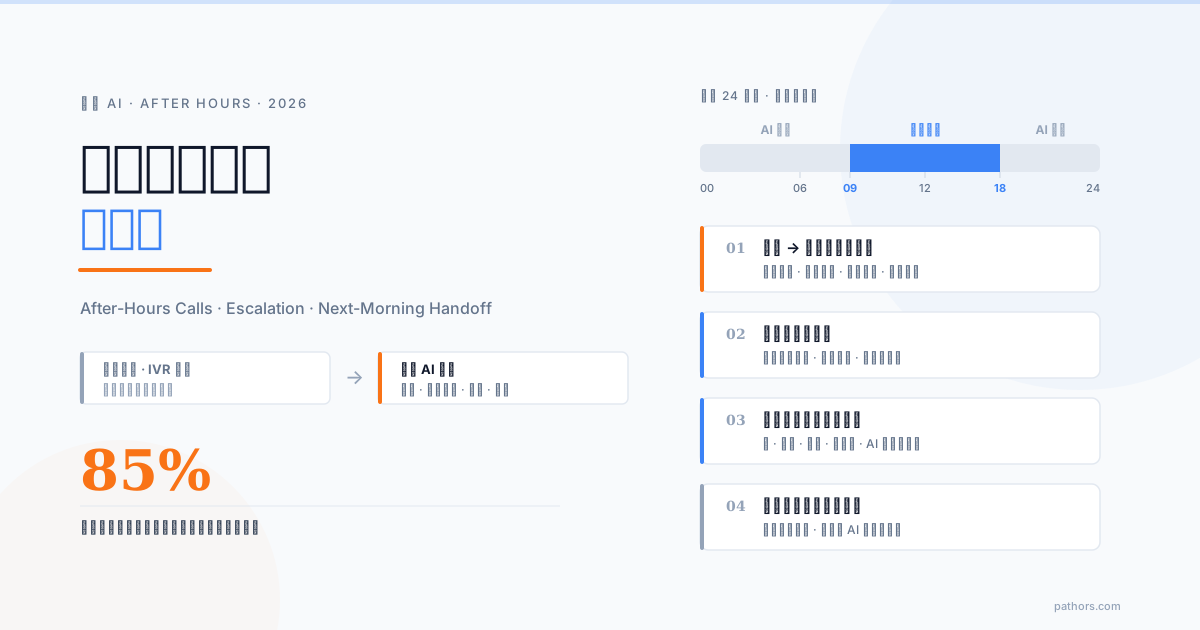
The best way to handle an after-hours call is to get the job done on the spot, not to record it and deal with it tomorrow. Calls outside business hours usually have one of three purposes: the caller wants to book, wants an answer to one question, or something has gone wrong and they need a person. A phone AI can pick up after closing, during lunch, on weekends and public holidays, put the booking into your system, answer common questions, turn messages into structured summaries, and escalate to the on-call phone when something is urgent. This guide works out what after-hours calls cost, compares the four options, and walks through designing an after-hours AI flow that is both safe and useful.
The short version: after-hours calls are not a minority, they are the most expensive ones
Miss a call during business hours and the customer may try again later. Miss one after hours and they usually will not. The overseas numbers are blunt: 86% of people who reach voicemail hang up without leaving a message, 85% never call back, and roughly three out of four callers simply ring the next business on the list when nobody answers (Quo/OpenPhone, 16 million calls, OnCrew). Those are US and UK figures, so Taiwan ratios will differ, but the behaviour is the same everywhere: someone who phones a clinic, a guesthouse or a plumber at 8 pm usually wants to settle the matter right now.
These calls are the most expensive because the intent is the clearest. People who still bother to phone after closing mostly want to book, order, or report a problem. What you miss is not a call; it is a customer who had already decided to buy.
Do the math with your own numbers
Use your own data:
Example: a clinic misses 30 calls a week in the evenings and on weekends. If three in ten would have become appointments at NT$1,500 per visit, that is 30 × 30% × 1,500 = NT$13,500 a week, over NT$700,000 a year. Missed-call counts come from your PBX or carrier logs; conversion and ticket size are your own experience. The result is the budget ceiling for any solution you evaluate.
An honest comparison of the four options
There are only four options. Each has a reason to exist, but the price is very different.
| Option | Caller experience | Gets the job done on the spot? | Next-morning work | Risk | Cost |
|---|---|---|---|---|---|
| Do nothing (ring out) | Worst; the caller cannot tell whether you are open | No | Return each missed call; most will not pick up | Caller phones the next business; nobody knows about emergencies | Zero, but the highest lost revenue |
| Voicemail | Most people hang up at the beep | No | Listen, transcribe, call back | Inaudible recordings, no number left; few messages make you think nothing happened | Almost free |
| Key-press IVR announcement | Hears the hours, presses 1 to leave a message, 2 for emergencies | No, only routing | Same as voicemail plus handling the emergency line | Long menus lose callers; the emergency line gets abused or goes unanswered | Low, PBX setup only |
| Phone AI | Says what they need in plain language; AI responds immediately | Yes: bookings, lookups, messages, urgent escalation | Read one structured list and call back only what needs a human | Answers badly without boundaries; escalation must be conservative | Medium: platform fee plus per-minute charges |
A few honest footnotes:
First, recognise that "after hours" is several different things
If you design off-hours as one block, the flow will make sense at 7 pm and feel strange at 3 am. In practice you need at least five time bands, because the reasons people call differ.
| Time band | Typical reason for calling | Recommended handling |
|---|---|---|
| Lunch break (12:00–13:30) | Booking, confirming an order, asking about details | AI handles it as in business hours; no need to stress the break |
| Closing to 10 pm | Booking for tomorrow or this week; questions people only get to after work | Full AI service: bookings, FAQs, messages; state when you will reply tomorrow |
| Late night (22:00–08:00) | Low volume, but a higher share of emergencies | Ask "is this urgent?" up front; escalate immediately if so, otherwise keep it brief |
| Weekends and public holidays | Booking for next week; asking whether you are open on holidays | Say clearly when you next open; book into the next available slot |
| Unplanned closure (typhoon, staff training) | The caller does not know you are closed today | First sentence explains the closure and why, then offers rescheduling or a message |
Once the bands are separate, greeting, permitted tasks and transfer rules can be set per band; in Pathors' approach the bands and holiday calendar are configuration, not script edits, so an admin maintains them without a vendor.
The skeleton of an after-hours AI flow
An off-hours flow breaks down into four parts.
1. Opening: state the situation clearly
The first sentence should tell the caller three things: where they have reached, that it is currently outside business hours, and what you can do for them. For example:
"Hello, this is ABC Dental. We are closed right now. I am the AI assistant and I can book an appointment, answer common questions, or take a message for the clinic; someone will get back to you at 9 am tomorrow. How can I help?"
2. The three things it can do: book, answer, take a message
3. The things it cannot do: be specific about what happens next
"We will call you back tomorrow" is the vaguest possible handoff. Give a time and a channel: "This needs to be confirmed by a nurse. Someone will call this number between 9 and 10 tomorrow morning; does that work?" A concrete time is what makes a caller willing to wait instead of phoning the next place.
4. Wrap-up: confirm and record
Before ending, repeat the key points (appointment time, message content, callback time) and write the whole call up as a record. That record is the basis of the next-morning handoff.
Escalation rules: better to over-transfer than to miss one
The biggest after-hours risk is not a lost booking; it is a genuinely urgent call that nobody hears about. Design escalation on two layers: scenarios and keywords.
Scenario layer (by industry):
Keyword layer: words like "bleeding", "severe pain", "leak", "no power", "will not start", "someone is hurt", "police" trigger the emergency path immediately, without waiting for the conversation to finish.
The path itself should be simple: say "I am transferring you to our on-call staff now" and transfer; if nobody answers within 30 seconds, read out the emergency contact number (or the local emergency services number) and push the whole conversation to the responsible person.
The design principle is "better to over-transfer than to miss one". Transferring a non-urgent call costs the on-call person a few minutes; missing a real one can cost a customer or your reputation. Medical and long-term care should be especially conservative: any mention of symptoms is treated as potentially urgent and the AI makes no medical judgement. For clinic-specific practice, see AI appointment scheduling for clinics.
Messages and the next-morning handoff: a structured summary, not an audio file
Voicemail's real problem is that the messages you do get are hard to act on: you listen, transcribe, and often cannot make out the phone number. Messages taken by an AI should come out as a structured summary containing at least:
Before opening, the responsible person should see one list, not a dozen recordings. Put the list where people will actually look the next morning: a LINE group, email, a CRM task queue, or the phone system's dashboard. For the CRM route, see the AI voice CRM integration guide.
Name one person to own callbacks, clearing every "needs a call" item before 9 am; a list without an owner sits there until noon.
Callbacks can be AI-driven too. If a customer asked last night to reschedule, the AI can call back in the morning to confirm the new slot and only hand over to a human if there is a further question. In Taiwan such outbound calls must respect the Personal Data Protection Act's rules on existing customer relationships; see Is AI outbound calling legal in Taiwan?.
Three common mistakes
1. Pretending to be human. A caller at 10 pm who hears a voice "from the on-call team" that cannot answer basic questions gets angrier than one told upfront it is an AI. Clarity in the first sentence makes people more willing to get to the point.
2. Answering everything with "we will call you back tomorrow". If the AI does not handle bookings and common questions, every caller gets the same deferral and you have bought a slightly more articulate voicemail. At least two or three things must be completable on the spot.
3. Making the customer repeat themselves. After five minutes with the AI at night, a human calling back the next morning with "how can I help you?" is enough to make the customer give up. Whoever calls back must have the summary in hand and open with "you mentioned last night that you would like to move Wednesday's appointment to Friday; let me confirm that". This is the basic rule of human handoff, covered in designing AI-to-human handoff.
Pre-launch test checklist
Before going live, make at least these calls yourself:
For a full procedure, use the phone AI test call checklist.
The best outcome for an after-hours call is that the matter is settled by the time the caller hangs up, and that the team walks in the next morning to one clear list instead of a pile of missed calls. Separate the time bands, keep escalation conservative, and turn messages into summaries, and a phone AI becomes a genuine 24-hour receptionist rather than another voicemail box.
If you are still evaluating how phone AI works overall, start with the complete guide to phone AI; booking-flow details are in the phone AI appointment booking guide; and for how to set up the after-hours forward on your PBX, see the phone AI and PBX integration guide.
Frequently Asked Questions
Can I use the AI only after hours and still answer calls myself during the day?
Yes, and that is the most common starting point. Set up time-based forwarding on your PBX or with your carrier: during business hours calls ring the front desk as usual; after closing, at lunch and on holidays they forward automatically to the AI number. Once the team is used to reading the AI's summaries, you can extend it to busy or unanswered daytime calls.
How do I set up time-based forwarding?
Three options: configure time-condition routing on your PBX; ask your carrier to set no-answer or time-of-day forwarding to the AI number; or connect the number directly to the phone AI platform and let it decide by your business-hours calendar whether to pass the call to the front desk or take it. The holiday calendar and unplanned closures should be editable by an admin without calling the vendor.
Will the AI handle emergency calls?
The AI does not handle the emergency itself; its job is to recognise it fast and route it out. Once emergency scenarios and keywords are configured, any mention of symptoms, leaks, power outages or injuries transfers the call to the on-call phone immediately; if nobody answers, it reads out a backup number and pushes a notification to the responsible person. The rule is better to over-transfer than to miss one, and medical or care settings should be even more conservative.
Do callers know it is an AI? Will they mind?
We recommend stating in the opening that it is an AI assistant and what it can do. In practice, after-hours callers care about one thing: whether their matter gets handled now. If they can book on the spot or leave a structured message, resistance is very low. What genuinely annoys people is a voice pretending to be human that cannot answer the question.
What about weekends and public holidays?
Load the holiday calendar into the system. The AI will open with something like 'we are closed today and reopen Monday at 9 am' and book straight into the next available slot. Public holidays, make-up working days and typhoon closures should all be maintainable by admin staff in the back office without touching the script.
Where do the messages go?
Wherever you configure: typically a LINE group, email, a CRM task queue or the platform dashboard. The content is not an audio file but a structured summary with the caller, phone number, reason, urgency and what the AI has already done. Pick one place, assign one owner, and clear the call-back items before 9 am.