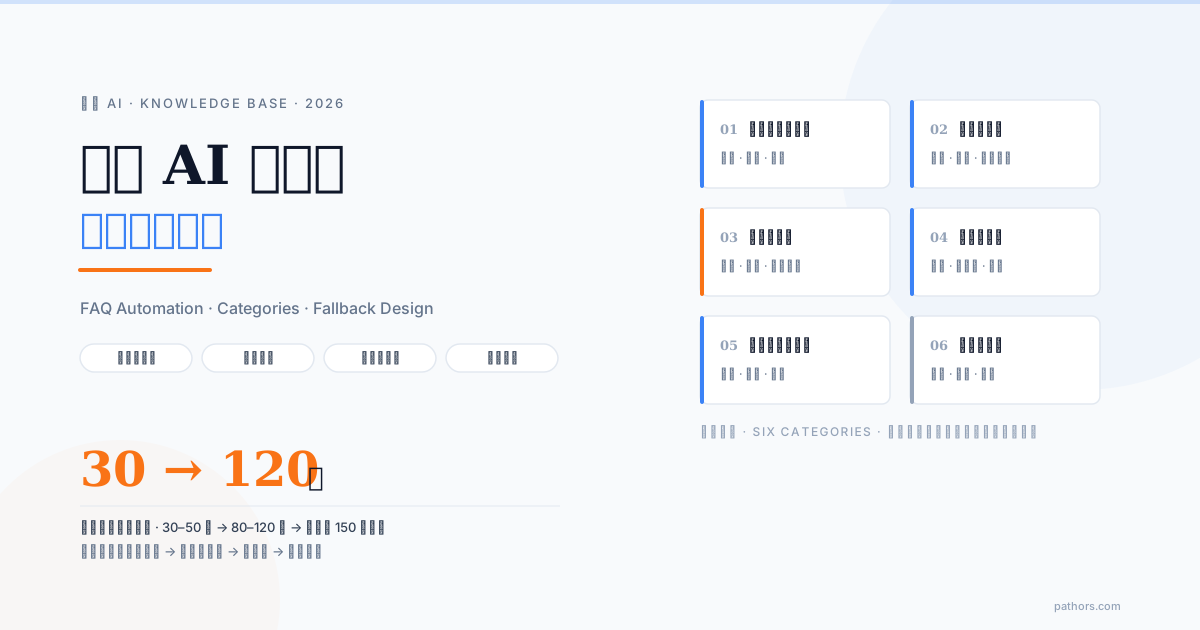
Phone AI FAQ automation is decided by the knowledge base, not the model. A workable phone knowledge base starts at 30 to 50 questions for a pilot, grows to roughly 80 to 120 at launch and 150 or more once mature. Each entry answers one thing, every answer is written to be spoken aloud, there is an explicit fallback rule for what the AI says when it does not know, and new questions are added every month from real call transcripts. Get those five things right and the same model performs very differently.
When business owners evaluate phone AI, attention goes to accent recognition and how natural the voice sounds. Those matter, but three months after launch what decides caller satisfaction is usually whether the AI had correct information to answer with. The model handles listening and speaking; the knowledge base is the answer itself, and you prepare that part. This guide is for the person who has to.
The conclusion first: what a good phone knowledge base looks like
From the deployments we have helped with, a phone knowledge base that actually works meets five conditions:
Where the questions come from: three sources and a call-reason table
Three sources
Source one: the front desk or customer service, out loud. Ask the colleague who answers the most calls to spend 30 minutes talking through the questions they got this week while you take notes. Do not send a survey: speaking is faster and surfaces the real phrasing callers use ("do you still have that thing"), which later becomes keywords in the knowledge base.
Source two: LINE, email and web form history. Pull the last three months of text messages and group them by question. Text channels overlap heavily with phone calls and quickly fill in what the front desk forgot.
Source three: call transcripts after launch. The other two cannot replace this one. Once live, every conversation has a transcript, and the segments where the AI could not answer or the caller repeated themselves are the next batch of entries.
Build a call-reason table
Do not rush to write answers. Sort the questions into a table first so you know which to build first and which the AI should never answer on its own.
| Call reason | Calls per week (estimate) | Can the AI answer directly | Needs a system lookup | Priority |
|---|---|---|---|---|
| Opening hours, address, parking | 40 | Yes | No | High |
| Price of a specific service | 25 | Yes, if prices are fixed | No | High |
| Booking or rescheduling | 30 | Yes, with integration | Yes, booking system | High |
| Order status, has it shipped | 15 | Yes, with integration | Yes, order system | Medium |
| Return and exchange rules | 10 | Yes | No | Medium |
| Complaints, asking for a specific person | 8 | No | No | Transfer |
| Partnership inquiries, sales calls | 5 | Partially, take a message | No | Low |
The weekly count only needs to be an order of magnitude; it exists for ranking. The "can the AI answer directly" and "needs a system lookup" columns decide whether a question goes into the knowledge base or becomes a system integration (more on that below).
How many questions: three stages
The answer to "how many entries before going live" depends on the stage:
| Stage | Entries | Goal |
|---|---|---|
| Pilot (first 2 to 4 weeks) | 30 to 50 | Cover the high-priority call reasons so the most common calls are handled well |
| Launch | 80 to 120 | Add medium-priority questions and phrasing variants; nearly every main call reason has an answer |
| Mature (after 3 months) | 150 and up | Transcript-driven long tail, 5 to 10 new entries a month |
Why more is not better
"Adding a bit more cannot hurt" carries two real costs:
1. Retrieval confusion. Before answering, the AI pulls the few most relevant passages from the knowledge base. The more entries there are and the more alike they look ("member refunds" and "non-member refunds" written almost identically), the more often it grabs the wrong one.
2. Latency and cost. Retrieved content goes to the model on every turn, so more content means higher latency and token cost per reply, and in voice callers notice a few extra tenths of a second. Retell's guide on structuring knowledge bases for voice AI makes the same point: a knowledge base adds latency and cost, so leave out what is not needed (source).
The right strategy is "start with high-frequency questions and let transcripts drive the long tail", not "dump the whole website in on day one".
How to categorize: six recommended categories
Categories serve two purposes: more accurate retrieval (consistent wording within a category means fewer wrong matches) and easier maintenance (when prices change, you only open "services and pricing"). They are not a menu for callers, who always ask in natural language; the AI finds the right category itself.
Six categories, with three sample questions each:
1. Hours and contact information
2. Services and pricing
3. Procedures and applications
4. Rules and policies
5. Technical or usage issues
6. Company and brand
After tagging every entry, check each category for two entries covering the same thing and merge them.
Rules for writing answers: phone answers are not web FAQs
A web FAQ is read; a phone answer is heard. Move the text over unchanged and callers will feel the AI is reading an announcement. Six rules:
1. Conversational. Use "we" and "you", not "the company" or "valued customer".
2. Conclusion first. The first sentence is the answer; details follow.
3. At most three pieces of information at once. Callers cannot hold a fourth; split long answers or ask which part they want.
4. Speakable numbers. "NT$1,280" becomes "one thousand two hundred eighty dollars"; times become "nine in the morning to six in the evening".
5. Never "please refer to". There is nothing to click on a call. Replace "check our website" with the answer itself or "I can text you the link".
6. Offer a next step. End with "shall I book that for you" or "anything else I can help with" so the conversation has direction.
Before and after
| Before (web FAQ) | After (phone answer) |
|---|---|
| Our business hours are Monday to Friday 09:00 to 18:00, closed on public holidays. See our website for announcements. | We are open weekdays from nine in the morning to six in the evening, and closed on weekends and public holidays. Which day were you thinking of? |
| Cancellation policy: cancellations within 24 hours of the appointment incur a NT$500 fee. | If you cancel within a day of your appointment there is a five hundred dollar fee; more than a day ahead there is no charge. Would you like me to reschedule it for you? |
When the AI cannot answer: a four-layer fallback
However complete the knowledge base, some questions fall outside it; what matters is how the AI reacts. In Pathors deployments the fallback has four layers, each handing off to the next:
Layer one: rephrase once to confirm intent. Callers are often imprecise. The ELOQ paper found that about 25 percent of natural-language questions contain a false premise and more than 50 percent are ambiguous (source). So the first move is to confirm, not to force an answer: "Are you asking about the conditions for a refund, or how long a refund takes to arrive?"
Layer two: say there is no data and offer the closest answer. If there is still no matching entry after confirming intent, say so: "I do not have exact information on that. Refunds are generally processed within seven business days, but for your case I would recommend confirming with a colleague." The key is do not guess. Get a price or a rule wrong once and the caller will hold you to it later, which costs far more than "I am not sure". This is where language-model hallucination is most dangerous in customer service; see LLM hallucination risks in customer service.
Layer three: transfer to a person or take a message for callback. In business hours, transfer with a summary of the conversation so the caller does not repeat themselves. Outside hours, take a name, number and question and commit to a callback time. Handoff design is covered in designing the AI-to-human handoff.
Layer four: log it as a pending entry. Every question that reaches layer two or three automatically enters a "missed questions" list, which is next month's source of new entries and the reason the knowledge base sharpens with use.
Layer one is the most often skipped. One clarifying question turns a surprising number of "cannot answer" into "can answer".
Knowledge base versus live system lookups
The knowledge base is for rules that rarely change. Data that changes (a table tonight, where my order is) only goes stale there and should be looked up live:
| Data type | Knowledge base | System lookup | Why |
|---|---|---|---|
| Hours, address, parking | Yes | No | Changes rarely |
| Service descriptions, fixed prices | Yes | No | Static explanation |
| Cancellation, return, payment rules | Yes | No | Policy; edits need human review |
| Availability tonight, room status | No | Yes | Changes by the minute |
| Order status, shipping | No | Yes | Per order; needs caller identity |
| Member points, balances | No | Yes | Personal data; verify identity first |
| Promotions, limited-time offers | Depends | Preferred | Changes often, easy to forget |
A practical test: if the answer depends on who is calling or when, it does not belong in the knowledge base. Those need a system integration; see the AI voice and CRM integration guide. The knowledge base owns the part where the answer is the same no matter who calls.
Maintenance rhythm after launch
Launch day is the beginning. Without maintenance, accuracy in our experience drops noticeably after about three months as prices change, promotions end and new questions appear. A suggested rhythm:
Who owns it? Not the engineers. The knowledge base is business knowledge, and the people who know it best are the front-desk lead, customer service lead or store manager. Engineers handle integrations and troubleshooting, but only the business side can judge whether an answer is right. A good phone AI platform lets non-technical staff edit the knowledge base directly with immediate effect; ask about it during vendor selection.
How do you automate FAQ answers on phone AI? The answer is not in the model but in the knowledge base you prepare. Build a call-reason table from front-desk interviews and message history, pilot with 30 to 50 high-frequency questions in six categories, rewrite every answer to be spoken on a call, set up the four-layer fallback, then review missed questions weekly, add entries monthly and clean up quarterly. Do that and you do not need the most expensive model to handle most calls well.
If you are still evaluating, start with what is phone AI: the 2026 complete guide for the overall architecture. Once the knowledge base is written, verify it with real calls using the phone AI test call checklist. For the data that changes, see the AI voice and CRM integration guide.
Frequently Asked Questions
How many questions does a phone AI knowledge base need before going live?
A pilot can start with 30 to 50, provided they cover the high-priority rows in your call-reason table. Plan for 80 to 120 at launch and 150 or more once mature. Do not chase volume early: too many entries cause retrieval confusion, add latency and cost, and are hard to maintain. Start with high-frequency questions and use post-launch transcripts to fill in the long tail.
Can I just paste our website FAQ into the knowledge base?
Use it as raw material, but not as-is. Website FAQs are written to be read and often contain lines like "see the table below" or "refer to our website" that cannot be spoken, and their numbers and times are not phrased for speech. Rewrite each entry so the conclusion comes first, no more than three pieces of information are given at once, numbers are speakable, and the answer ends with a next step. Merge duplicates while you are at it.
Will the phone AI make things up or invent rules that do not exist?
It can. This is a known risk of language models, and it is expensive on price and policy questions. Three things reduce it: keep each entry to one topic so similar content does not interfere; set an explicit fallback rule of "if nothing is found, say so honestly and do not speculate"; and run test calls before launch to check how the AI reacts to out-of-scope questions. Saying "I do not know" honestly beats a half-right guess every time.
What happens when a caller asks about something outside the knowledge base?
A good design has four fallback layers: first rephrase once to confirm intent, because many questions are ambiguous; if there is still no data, say so and offer the closest answer; then transfer to a person or take a message for callback; finally log the question in a missed-questions list to feed next month's additions. What the AI says at each layer should be written down in advance, not improvised.
How often should the knowledge base be updated?
Run three rhythms in parallel: 15 minutes a week reviewing the missed-questions list, 5 to 10 new entries a month, and a quarterly cleanup of stale content. On top of that, any business change such as a price update, new hours or a new service should be reflected the same day rather than waiting for the schedule. In our experience, an unmaintained knowledge base loses noticeable accuracy after about three months.
Who should maintain the knowledge base?
The people who know the business best, usually the front-desk lead, customer service lead or store manager, not the engineers. Engineers own integrations and troubleshooting, but only the business side can judge whether an answer is correct. When choosing a phone AI platform, confirm that non-technical staff can edit the knowledge base directly with immediate effect; otherwise every one-line change waits on an engineering schedule and maintenance stalls.